
14 KiB
8.1: Spending a Multisig with a PSBT
In the future, bitcoin-cli may or may not improve its methodologies for natively spending multisig funds. But whether it does or not, there's a more modern way to spend multisigs in the modern: Partially Signed Bitcoin Transactions, or PSBTs. We're going to explore how to do so in this section, before diving into the further power of of PSBTs in the rest of this chapter.
Understand the PSBT: The Easy Stuff
In brief: a PSBT is a specified format for collaboratively creating Bitcoin transactions. This collaboration is managed through the careful creation of roles:
- Creator makes the PSBT.
- Updater adds UTXOs, scripts, and other data to the PSBT.
- Signer signs the PSBT.
- Finalizer closes out the PSBT, possibly combining PSBTs from multiple Signers.
- Extractor turns the PSBT into a transaction for the Bitcoin network.
It's a simple progression, though the Signer may happen many times:
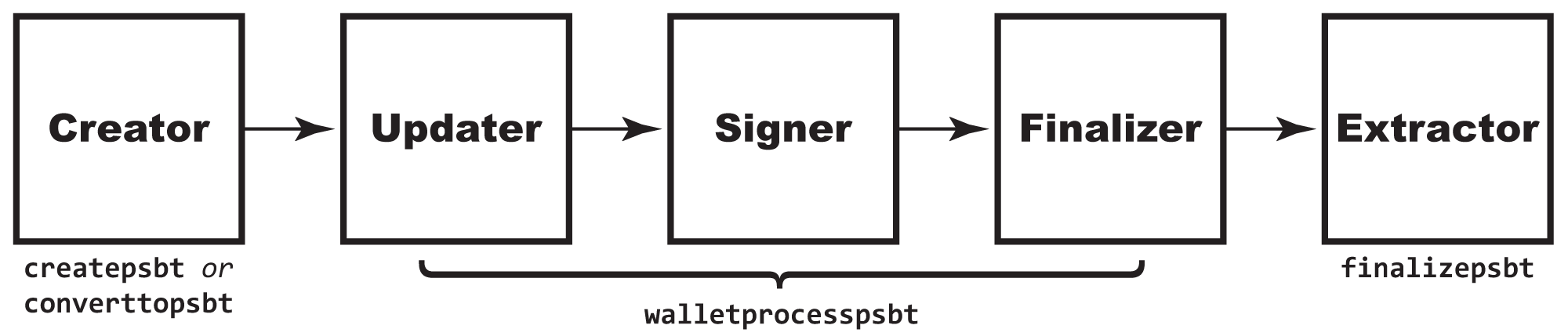
These different roles may be taken on by different people, or the same person may fulfill several roles.
There are also a lot of things that can be done with PSBTs, of which spending multisig funds, but we'll talk about those options more in the next section. For now, here's how to use a PSBT to respend multisig funds that are protected by keys in two different wallets and that are watched by funds in a separate, watch-only wallet.
Use a PSBT to Spend MultiSig Funds
In the last chapter, we sent funds to a multisig address:
$ bitcoin-cli -rpcwallet=watchmulti getbalance
0.00200000
The co-owners of the multisig are now ready to split it up.
Collect Your Data
Each co-owner supplies an address for receipt of the funds, then they're gathered on one machine:
machine1$ split1=$(bitcoin-cli -rpcwallet="" getnewaddress)
tb1qjpjx8wlhapsd0p5n9m7dl8e8myrpg4l9hu46rz

machine2$ split2=$(bitcoin-cli -rpcwallet="" getnewaddress)
machine2$ echo split2
tb1q5u203aa6zf7jgjxk8rp7n5z83xfjwewd7u0a20

machine1$ split2="tb1q5u203aa6zf7jgjxk8rp7n5z83xfjwewd7u0a20"
You also need to know the UTXO and vout of the transaction they're spending, as usual:
machine1$ utxo_txid=$(bitcoin-cli -rpcwallet=watchmulti listunspent | jq -r '.[0] | .txid')
machine1$ utxo_vout=$(bitcoin-cli -rpcwallet=watchmulti listunspent | jq -r '.[0] | .vout')
Create the PSBT
One of the parties then creates a PSBT (that's the Creator role).
You'll note that createpsbt looks a lot like the createrawtransaction command you met back in §5.4.
creator$ psbt=$(bitcoin-cli -named createpsbt inputs='''[ { "txid": "'$utxo_txid'", "vout": '$utxo_vout' } ]''' outputs='''{ "'$split1'": 0.0009998,"'$split2'": 0.0009998 }''')
At every stage, you can use the analyzepsbt RPC to see what's needed as the next step in the PSBT.
$ bitcoin-cli analyzepsbt $psbt
{
  "inputs": [
    {
      "has_utxo": false,
      "is_final": false,
      "next": "updater"
    }
  ],
  "next": "updater"
}
In this case, it needs more info on the UTXO and (though it's not listed yet) the redeemScript.
Update the PSBT
Both of the UTXO and the redeemScript were recorded in the watchmulti wallet when we imported the multisig. To add them we use the walletprocesspsbt command, which will always update a PSBT with info from the designated wallet.
updater$ psbt=$(bitcoin-cli -rpcwallet="watchmulti" walletprocesspsbt $psbt | jq -r '.psbt')
We can now reanalyze the PSBT, and it acknowledges that the PSBT is ready to go, it just needs signers:
$ bitcoin-cli analyzepsbt $psbt
{
  "inputs": [
    {
      "has_utxo": true,
      "is_final": false,
      "next": "signer",
      "missing": {
        "signatures": [
          "38101947394ce3e088b6ba84c19783731b603363",
          "0394feb37f7674b769309337445da86b99dee83f"
        ]
      }
    }
  ],
  "estimated_vsize": 168,
  "estimated_feerate": 0.00000238,
  "fee": 0.00000040,
  "next": "signer"
}
Sign the PSBT
Here's one of the magic features of PSBTs: they can be updated and signed in parallel! The Creator/Updater just sends the PSBT to each person:
$ echo $psbt
cHNidP8BAHECAAAAAT4TNngXer/516PCopCaldswA84O2DuOrjI96CnYtkHrAQAAAAD9////AoyGAQAAAAAAFgAUDxr9tZEk6HuEqwJratxEZgdYqHmMhgEAAAAAABYAFKcU+Pe6En0kSNY4w+nQR4mTJ2XNAAAAAAABAIkCAAAAAWtqWUkvCC+bIQ0Y+RNM5sSiS4oPa9ILa4SV3YUMff7SbQEAAAD9////AteWBAAAAAAAIlEg35Pids1jTkfrgrzTG8LpPlzkPzi76pCjdVURwfnSLIhADQMAAAAAACIAID4RoDr3ZQ4gvfR2gTCkx0a0/XXWltNCC/bn0PhgobmPAAAAAAEBK0ANAwAAAAAAIgAgPhGgOvdlDiC99HaBMKTHRrT9ddaW00IL9ufQ+GChuY8BBUdSIQOTlfoZ1lEvAwQyEM0+mgOoUPeo2YbI810w8u/CgajTMSEDxX7XB3XXphZ3hRTnOP7wlGtL5O4yRAsZ9l3dbjRZg8BSriIGA5OV+hnWUS8DBDIQzT6aA6hQ96jZhsjzXTDy78KBqNMxBDgQGUciBgPFftcHddemFneFFOc4/vCUa0vk7jJECxn2Xd1uNFmDwAQDlP6zAAAA
Each person then signs that PSBT on their own machine, again using the walletprocesspsbt command.
Here's the first user doing so:
machine1$ psbt_sig1=$(bitcoin-cli -rpcwallet="" walletprocesspsbt $psbt | jq -r '.psbt')
They indeed now see one less signer is needed:
$ bitcoin-cli analyzepsbt $psbt_sig1
{
  "inputs": [
    {
      "has_utxo": true,
      "is_final": false,
      "next": "signer",
      "missing": {
        "signatures": [
          "0394feb37f7674b769309337445da86b99dee83f"
        ]
      }
    }
  ],
  "estimated_vsize": 168,
  "estimated_feerate": 0.00000238,
  "fee": 0.00000040,
  "next": "signer"
}
The other user does the same thing:
machine$ psbt_sig2=$(bitcoin-cli -rpcwallet="" walletprocesspsbt $psbt | jq -r '.psbt')
They see a mirrored result, with the other signature missing:
$ psbt_sig2=$(bitcoin-cli -rpcwallet="" walletprocesspsbt $psbt | jq -r '.psbt')
Shannons-MacBook-Pro:~ ShannonA$ bitcoin-cli analyzepsbt $psbt_sig2
{
  "inputs": [
    {
      "has_utxo": true,
      "is_final": false,
      "next": "signer",
      "missing": {
        "signatures": [
          "38101947394ce3e088b6ba84c19783731b603363"
        ]
      }
    }
  ],
  "estimated_vsize": 168,
  "estimated_feerate": 0.00000238,
  "fee": 0.00000040,
  "next": "signer"
}
Combine the PSBT
Someone now takes receipt of both PSBTs and uses the combinepsbt RPC to bring them together:
finalizer$ psbt_complete=$(bitcoin-cli combinepsbt '''["'$psbt_sig1'", "'$psbt_sig2'"]''')
It looks good!
$ bitcoin-cli analyzepsbt $psbt_complete
{
  "inputs": [
    {
      "has_utxo": true,
      "is_final": false,
      "next": "finalizer"
    }
  ],
  "estimated_vsize": 168,
  "estimated_feerate": 0.00000238,
  "fee": 0.00000040,
  "next": "finalizer"
}
The decodepsbt RPC (a mirror to the decoderawtransaction RPC) can be used at any stage to see what the PSBT looks like. This is a particularly good idea not that we're about to finalize it.
$ bitcoin-cli decodepsbt $psbt_complete
{
  "tx": {
    "txid": "32199698903c02a90510e77b04948edad7c41dec926e2af057e7782a57d5841b",
    "hash": "32199698903c02a90510e77b04948edad7c41dec926e2af057e7782a57d5841b",
    "version": 2,
    "size": 113,
    "vsize": 113,
    "weight": 452,
    "locktime": 0,
    "vin": [
      {
        "txid": "eb41b6d829e83d32ae8e3bd80ece0330db959a90a2c2a3d7f9bf7a177836133e",
        "vout": 1,
        "scriptSig": {
          "asm": "",
          "hex": ""
        },
        "sequence": 4294967293
      }
    ],
    "vout": [
      {
        "value": 0.00099980,
        "n": 0,
        "scriptPubKey": {
          "asm": "0 0f1afdb59124e87b84ab026b6adc44660758a879",
          "desc": "addr(tb1qpud0mdv3yn58hp9tqf4k4hzyvcr432re5gdhc6)#ttwtnak8",
          "hex": "00140f1afdb59124e87b84ab026b6adc44660758a879",
          "address": "tb1qpud0mdv3yn58hp9tqf4k4hzyvcr432re5gdhc6",
          "type": "witness_v0_keyhash"
        }
      },
      {
        "value": 0.00099980,
        "n": 1,
        "scriptPubKey": {
          "asm": "0 a714f8f7ba127d2448d638c3e9d04789932765cd",
          "desc": "addr(tb1q5u203aa6zf7jgjxk8rp7n5z83xfjwewd7u0a20)#knxneukg",
          "hex": "0014a714f8f7ba127d2448d638c3e9d04789932765cd",
          "address": "tb1q5u203aa6zf7jgjxk8rp7n5z83xfjwewd7u0a20",
          "type": "witness_v0_keyhash"
        }
      }
    ]
  },
  "global_xpubs": [
  ],
  "psbt_version": 0,
  "proprietary": [
  ],
  "unknown": {
  },
  "inputs": [
    {
      "witness_utxo": {
        "amount": 0.00200000,
        "scriptPubKey": {
          "asm": "0 3e11a03af7650e20bdf4768130a4c746b4fd75d696d3420bf6e7d0f860a1b98f",
          "desc": "addr(tb1q8cg6qwhhv58zp005w6qnpfx8g6606awkjmf5yzlkulg0sc9phx8sqkltdd)#vjkdfwda",
          "hex": "00203e11a03af7650e20bdf4768130a4c746b4fd75d696d3420bf6e7d0f860a1b98f",
          "address": "tb1q8cg6qwhhv58zp005w6qnpfx8g6606awkjmf5yzlkulg0sc9phx8sqkltdd",
          "type": "witness_v0_scripthash"
        }
      },
      "non_witness_utxo": {
        "txid": "eb41b6d829e83d32ae8e3bd80ece0330db959a90a2c2a3d7f9bf7a177836133e",
        "hash": "eb41b6d829e83d32ae8e3bd80ece0330db959a90a2c2a3d7f9bf7a177836133e",
        "version": 2,
        "size": 137,
        "vsize": 137,
        "weight": 548,
        "locktime": 0,
        "vin": [
          {
            "txid": "d2fe7d0c85dd95846b0bd26b0f8a4ba2c4e64c13f9180d219b2f082f49596a6b",
            "vout": 365,
            "scriptSig": {
              "asm": "",
              "hex": ""
            },
            "sequence": 4294967293
          }
        ],
        "vout": [
          {
            "value": 0.00300759,
            "n": 0,
            "scriptPubKey": {
              "asm": "1 df93e276cd634e47eb82bcd31bc2e93e5ce43f38bbea90a3755511c1f9d22c88",
              "desc": "rawtr(df93e276cd634e47eb82bcd31bc2e93e5ce43f38bbea90a3755511c1f9d22c88)#gamut0k2",
              "hex": "5120df93e276cd634e47eb82bcd31bc2e93e5ce43f38bbea90a3755511c1f9d22c88",
              "address": "tb1pm7f7yakdvd8y06uzhnf3hshf8ewwg0ech04fpgm425gur7wj9jyqh82xcx",
              "type": "witness_v1_taproot"
            }
          },
          {
            "value": 0.00200000,
            "n": 1,
            "scriptPubKey": {
              "asm": "0 3e11a03af7650e20bdf4768130a4c746b4fd75d696d3420bf6e7d0f860a1b98f",
              "desc": "addr(tb1q8cg6qwhhv58zp005w6qnpfx8g6606awkjmf5yzlkulg0sc9phx8sqkltdd)#vjkdfwda",
              "hex": "00203e11a03af7650e20bdf4768130a4c746b4fd75d696d3420bf6e7d0f860a1b98f",
              "address": "tb1q8cg6qwhhv58zp005w6qnpfx8g6606awkjmf5yzlkulg0sc9phx8sqkltdd",
              "type": "witness_v0_scripthash"
            }
          }
        ]
      },
      "partial_signatures": {
        "03c57ed70775d7a616778514e738fef0946b4be4ee32440b19f65ddd6e345983c0": "304402205817b258f77032a4c3f516e8cbff2a2d52da790666c95d065fb6e287d90f83be02205aea18a1120ce911008b2f678523ac969abb7237a0ae725c002a2b44ae6e90d901",
        "039395fa19d6512f03043210cd3e9a03a850f7a8d986c8f35d30f2efc281a8d331": "304402206ccab96aa1b137fd7a59459b374755ae80494e6a9804810c53e6cda10e69946602202ce285f7f2625f8f184d7d8e548f5cb8c1e26c2b1a3e9ed8be5e2b24f06c08d001"
      },
      "witness_script": {
        "asm": "2 039395fa19d6512f03043210cd3e9a03a850f7a8d986c8f35d30f2efc281a8d331 03c57ed70775d7a616778514e738fef0946b4be4ee32440b19f65ddd6e345983c0 2 OP_CHECKMULTISIG",
        "hex": "5221039395fa19d6512f03043210cd3e9a03a850f7a8d986c8f35d30f2efc281a8d3312103c57ed70775d7a616778514e738fef0946b4be4ee32440b19f65ddd6e345983c052ae",
        "type": "multisig"
      },
      "bip32_derivs": [
        {
          "pubkey": "039395fa19d6512f03043210cd3e9a03a850f7a8d986c8f35d30f2efc281a8d331",
          "master_fingerprint": "38101947",
          "path": "m"
        },
        {
          "pubkey": "03c57ed70775d7a616778514e738fef0946b4be4ee32440b19f65ddd6e345983c0",
          "master_fingerprint": "0394feb3",
          "path": "m"
        }
      ]
    }
  ],
  "outputs": [
    {
      "bip32_derivs": [
        {
          "pubkey": "03563abd9a7dd354eb08e7cb180d4297922b09139dfe1d2563bc59d6eb98335ef0",
          "master_fingerprint": "d2743951",
          "path": "m/84h/1h/0h/0/10"
        }
      ]
    },
    {
      "bip32_derivs": [
        {
          "pubkey": "034f2dc681dfbd0f0004dc87aa0d66531890cd8c077469342cb12d1ad055aa2b54",
          "master_fingerprint": "e18dae20",
          "path": "m/84h/1h/0h/0/8"
        }
      ]
    }
  ],
  "fee": 0.00000040
}
Obviously, there's a lot of data here. We can see our UTXO in the vin, the payouts in the vout, and lots more.
Finalize the PSBT
The PSBT is just a transitory format, used for collaboratively creating and signing everything. Once it's signed and complete, you need to transalate it to a normal raw transaction, which is done with finalizepsbt
extractor$ psbt_hex=$(bitcoin-cli finalizepsbt $psbt_complete | jq -r '.hex')
You can then transmit it, as usual:
$ bitcoin-cli -named sendrawtransaction hexstring=$psbt_hex
32199698903c02a90510e77b04948edad7c41dec926e2af057e7782a57d5841b
Summary: Spending a Multisig with a PSBT
The PSBT, a collaborative method for creating transactions allowed you to spend a multisig. Here's the basic process we used here:
- Create a bare PSBT that says what to spend and who to send it to.
- Use a wallet that knows about the UTXOs to fill in that data.
- Have each required signer sign.
- Combine and finalize the PSBT, then send the transaction.
🔥 What's the power of a PSBT? A PSBT allows for the creation of trustless transactions between multiple parties and multiple machines. If more than one party would need to fund a transaction, if more than one party would need to sign a transaction, or if a transaction needs to be created on one machine and signed on another, then a PSBT makes it simple without depending on the non-standardized partial signing mechanisms that used to exist before PSBT.
What's Next?
Continue "Expanding Bitcoin Transactions with PSBTs" with §8.2: Expanding PSBTs with More Use Cases.